
Before you can build anything with the Machine Builder Libraries, you need to get them onto your computer. In this tutorial, I’ll show you where to find them and how to download them.
Rockwell Automation’s Machine Builder Libraries are free to download and use.
To download them, head over to Rockwell Automation’s Product Compatibility and Download Center, also known as the PCDC and login using your Rockwell Automation account.
After logging in, click on the Find downloads tile.

In the search bar, type Machine Builder Libraries.
There are two results:
I’m going to focus on the core Machine Builder Libraries in these tutorials so I select Machine Builder Libraries.

The Machine Builder Libraries are added to my download list and I click the download icon to start downloading them.

On the next screen, I can specify which version of the Machine Builder Libraries I want to download. By default, the latest version is selected.
I check the box to confirm that I want to download this version and then click the Download Selections button.

On the next screen, I read the Software End-User License Agreement carefully (lol) and click Accept and Download

On the next screen, an executable to launch Rockwell Automation’s Download Manager is automatically downloaded. I always recommend using the Download Manager for large downloads, like Studio 5000 Logix Designer.
Since the Machine Builder Libraries are a small, zipped file, I will skip the download manager and expand the Direct Download Links section.
In this section, I right-click on the file and select Save link as

Then I specify where on my computer I want to save the Machine Builder Libraries on my computer and click Save.

Now the Machine Builder Libraries are downloaded on my computer.
Finally, I repeat this process to download Rockwell Automation’s Power Device Object library.
This library contains the library objects for PowerFlex drives and Kinetix servo products that we will use extensively in this series — if you’re planning to follow along, I recommend downloading this library too.

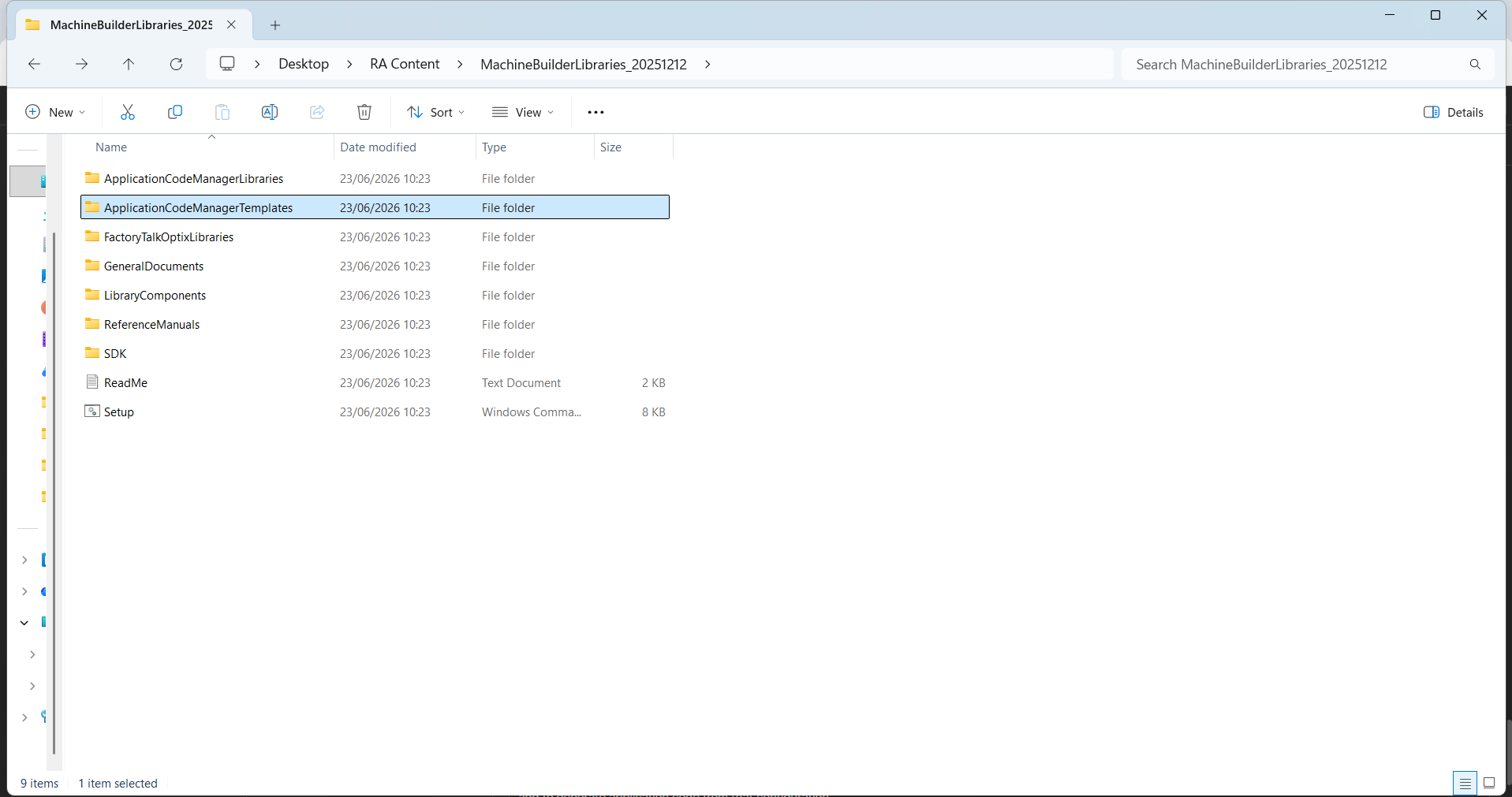
After downloading the libraries to you computer, unzip them and open the Machine Builder Libraries folder.
As you can see, the folder contains a lot of subfolders that are part of the libraries. We'll explore the contents of these subfolders throughout the series. For now, here's a brief overview of what is in each set of subfolders.
The LibraryComponents and FactoryTalkOptixLibraries folders contain the software objects that are used in Studio 5000 Logix Designer and HMI projects. If you drill into these folders you will see that there are a lot of different objects for different Rockwell Automation products.
The GeneralDocuments, ReferenceManuals, and SDK folders contain information on how to use and extend the Machine Builder Libraries. This documentation is really good for understanding how a specific component in the Machine Builder Libraries works.
Finally, ApplicationCodeManagerLibraries and ApplicationCodeManagerTemplates folders contain files that tell Application Code Manager how to use the Machine Builder Libraries' software objects. Application Code Manager is a tool from Rockwell Automation that can be used to define the structure of application code through configuration and to generate application code from that configuration.
In this tutorial, I showed you how to download Rockwell Automation’s Machine Builder Libraries and Power Device Library. We also explored the structure of the Machine Builder Libraries download.
In the next tutorial, I will show you how to register these libraries in Application Code Manager so that the content is available to use.
Get new content delivered straight to your inbox:
.png)
.png)